
|14 min read

Last updated on July 01, 2026
Last updated on July 01, 2026
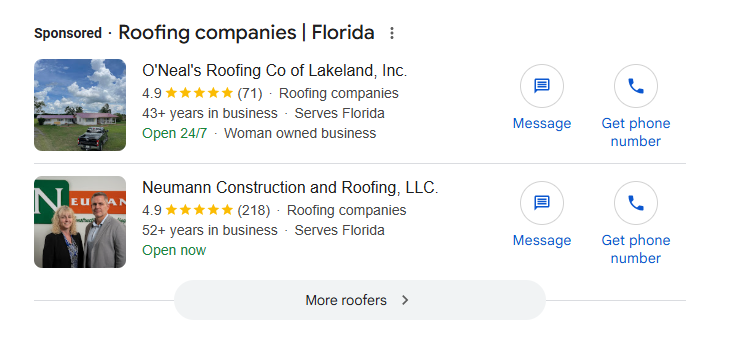
Between Search Ads, Local Services Ads, and Google Guaranteed, Google offers three distinct paid placements for roofing companies, and most roofers are running only one of them, or running all three without understanding how they fit together.
This guide covers the full Google paid ecosystem: how each placement works, what it costs, when to use it, and how to build campaigns that drive booked jobs rather than clicks that go nowhere. If your Google campaigns are running but results are inconsistent, the fix is usually in the structure, not the budget.
Quick Answer
Google Ads for roofers covers two paid channels on Google: Search Ads (pay-per-click, or PPC, text ads triggered by keyword searches) and Local Services Ads (LSA, a pay-per-lead format that appears above Search Ads and carries a Google Guaranteed badge). Most residential roofing companies run both: Search Ads for keyword-level control and LSA for high-trust leads above the fold. A realistic starting budget for Google campaigns specifically is $3,000–$5,000/month in combined ad spend.
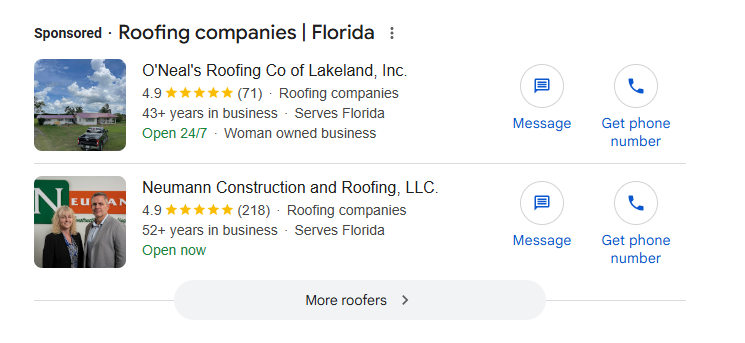
Google Ads places your roofing company at the top of search results when a homeowner actively looks for a roofer, and you pay only when they click or call. Google Ads works for roofing companies because homeowners search at high-intent moments: after a storm, after spotting a leak, or when a roof is approaching the end of its life. Google puts your company in front of them at exactly that moment.
Google Search Ads are text ads that appear at the top of search results when a homeowner searches for roofing. You control which searches trigger your ad, how much you bid, and where the homeowner lands after the click.
A well-structured roofing Search Ads account separates services into distinct campaigns or ad groups rather than running all keywords together.
Organize by job type: emergency repair, roof replacement, storm damage, and commercial roofing. Each represents a different homeowner intent, urgency level, and job value. When you separate them, you write ad copy that matches each homeowner's situation, send them to a landing page built for that specific job, and bid differently based on each lead's value. Running everything in one campaign means emergency keywords and replacement keywords compete for the same budget and the same generic landing page.
Google offers three keyword match types: broad, phrase, and exact. Each controls how closely a homeowner's search must match your keyword for your ad to appear
Broad match triggers your ad for searches Google considers related to your keyword, which can include searches with little connection to roofing services. It reaches the widest audience but produces the most irrelevant clicks. Phrase match triggers when the homeowner's search contains your keyword phrase in order, with some variation allowed before and after. Exact match triggers only for that specific search or very close variants.
Most roofing campaigns over-rely on broad match and bleed budget on clicks from homeowners searching for roofing jobs, DIY tutorials, or materials. Start with phrase and exact match. Use broad match only after you have enough conversion data to identify which broader searches actually produce leads.
Negative keywords are search terms you explicitly exclude from your campaign so your ad does not appear for searches that are unlikely to convert.
Every roofing campaign needs a negative keyword list built before the first ad goes live. Start with these five categories:
Missing negatives means paying for clicks from homeowners who have no intention of hiring you.
Quality Score is Google's diagnostic tool for measuring how relevant your ads, keywords, and landing pages are to the homeowner searching. It is scored on a scale of 1 to 10 at the keyword level.
It has three components: expected clickthrough rate (how likely your ad is to be clicked when shown), ad relevance (how closely your ad matches the intent behind the search), and landing page experience (how relevant and useful your page is after the click). Each component is rated above average, average, or below average compared to other advertisers showing for the same keyword over the last 90 days. (Source: Google Ads Help)
Quality Score is not an auction input. It is a diagnostic signal. A roofing company with a Quality Score of 3 for "emergency roof repair" is likely sending that homeowner to a generic homepage rather than a page designed specifically for emergency repairs. The mismatch raises what you pay per click for comparable ad positions.
The right bidding strategy depends on how much conversion data your account has accumulated.
New campaigns with fewer than 30 conversions per month lack sufficient signal for automated bidding to work effectively. Start with manual CPC or maximize clicks to build data without handing control to an algorithm that hasn't learned anything yet. Once your account consistently reaches 30 or more conversions per month, Target CPA (cost per acquisition) lets Google optimize bids toward your cost-per-lead target. Do not switch to Target CPA prematurely. Google will overspend or underspend while searching for a pattern that does not yet exist in the data.
Location targeting sets the geographic radius where your ads appear. Bid adjustments let you increase or reduce spend based on when and where leads are most likely to convert.
Set your targeting to your actual service radius, not a broad city or metro area. Increase bids during evening hours and weekends when homeowners are home and searching. For emergency campaigns, run ads 24 hours a day, storm damage calls do not wait for business hours. Reduce bids in the overnight window for non-emergency campaigns to avoid paying for clicks that go unanswered.
Local Services Ads are the highest-trust paid placement on Google for roofing companies. They sit above Search Ads, charge per lead rather than per click, and carry a Google Guaranteed badge that homeowners recognize as a signal your business has been vetted by Google.
How LSA Differs from Search Ads
The core difference between LSA and Google Search Ads is the cost model: LSA charges per lead (a direct call or message from the homeowner), while Search Ads charges per click regardless of whether the homeowner contacts you.
With LSA, you do not bid on keywords. Google matches your ads to relevant searches based on your registered service categories, your location, and your business profile. You have less keyword-level control than Search Ads, but you pay nothing for clicks that do not result in direct contact.
To run LSA, your roofing company must pass Google's verification process: a background check on the business owner, proof of a valid contractor's license, a current certificate of insurance, and a verified Google Business Profile with at least 5 reviews in most service categories.
Verification typically takes two to four weeks. Google checks that your license covers the services you are advertising, that your insurance meets their minimums, and that your GBP is active and consistent with your business details. Google Business Profile for Roofers is the foundation for LSA approval an incomplete or inconsistent profile is one of the most common reasons applications stall before the background check even runs.
Google ranks LSA ads based on five factors:
Reviews are the biggest factor you actively control. A roofing company with 80 reviews at a 4.8 rating consistently outranks a competitor with 20 reviews at 4.5, all else equal. Response time matters directly. Missed calls and unanswered messages lower your ranking. Google measures your average response time and may display it in your ad. (Source: Google Local Services Ads Help)
Google allows you to dispute LSA leads that do not qualify as valid and request a credit. Flag the lead in your LSA dashboard within 30 days and select the qualifying reason.
What qualifies for a dispute:
What does not qualify:
Document every disputed lead with notes before submitting. Poor documentation is the most common reason valid disputes get rejected.
The Google Guaranteed badge tells homeowners that your business has passed Google's background and license verification and is backed by Google's satisfaction guarantee of up to $2,000 on jobs booked through LSA.
For homeowners, the badge means they can file a claim with Google if they are dissatisfied with the work. For the roofer, it is the only paid placement where Google backs the work with a financial guarantee. Roofing companies that earn the badge and maintain it carry a trust signal in paid search that no Search Ads budget can replicate.
A realistic starting budget for Google campaigns, specifically excluding Facebook and other paid channels, is $3,000–$5,000/month in combined Search and LSA spend. If you are running a full multi-channel paid strategy, your total budget across all platforms will be higher. The roofing PPC guide explains how the total budget splits across Google, Facebook, and other channels.
Below $1,500/month on Google, most campaigns lack the click volume to identify what is converting and what is wasting spend. In major metros, $5,000–$8,000/month is typically required to maintain a competitive impression share against established local companies.
As a starting split, direct 50–60% of your Google budget toward LSA once you are verified. The pay-per-lead model is more capital-efficient than paying per click for unqualified traffic. Search Ads take the remaining budget and focus on your highest-intent keywords and emergency campaigns. When a storm event hits your market, raise your Search Ads daily caps immediately. Emergency searches spike within hours and drop within days. The companies that capture those leads are the ones with room in their daily budget.
When you're ready to hand your campaigns to a team tracking cost per booked appointment rather than clicks, Rizen's paid ads management runs Search and LSA together for roofing companies at this level.
The three campaign types that drive the most booked jobs for residential roofers are emergency and storm damage campaigns, replacement and inspection campaigns, and seasonal campaigns. Each targets a different homeowner at varying levels of urgency.
Emergency and storm damage campaigns target homeowners in immediate need: searches like "roof leak repair now," "storm damage roofer [city]," and "emergency roof repair," where homeowners call the first credible company they find.
Bid higher on emergency keywords than on replacement keywords. The close rate on an emergency lead is significantly higher because the homeowner has no choice but to act.
Replacement and inspection campaigns target homeowners whose roofs are aging or showing wear but are not in immediate crisis.
These leads take longer to close. The homeowner is getting multiple quotes, reading reviews, and taking their time. Keywords like "roof replacement quote," "roof inspection near me," and "how much does a new roof cost" reflect a buyer in research mode. Landing pages for replacement campaigns should include before-and-after photos, financing options, and trust signals like warranty information and company history. Retargeting matters more here than in emergency campaigns, because the homeowner will likely leave your site before making a decision.
Seasonal campaigns adjust your bidding and messaging based on when demand peaks in your specific market.
Spring inspection campaigns encourage homeowners to check for winter damage before summer. Post-storm surge windows call for ad copy that references the event directly and emphasizes rapid response. Homeowners in storm-affected areas respond to messaging that acknowledges what just happened, not generic "roof repair" language. Pre-winter campaigns target homeowners in cooler markets who want repairs completed before freeze season. Plan your seasonal calendar at the start of the year so bid adjustment rules are already in place before the next surge.
A well-run roofing Google Ads campaign delivers a measurable cost per booked appointment, not just cost per click or cost per form fill.
With 89% of roofing contractors anticipating sales growth over the next three years, the companies that win the most jobs will be the ones that know exactly what each campaign costs per booked job. (Source: Roofing Contractor)
Three numbers every roofing Google campaign should track:
The gap between cost per lead and cost per booked appointment tells you how your follow-up process is performing. A campaign producing $80 leads with a 30% booking rate costs you $267 per appointment. The same campaign with a 60% booking rate costs $133. The ads did not change. The follow-up did.
For the full picture of how a Google lead becomes a booked job, The Complete Guide to Roofing Sales covers qualification, estimate structure, and a close process built for the pace at which Google leads come in. If you want cost per lead tracked by source and separated from every other channel you run, the CRM comparison for roofers breaks down which platforms make that visible.
$3,000–$5,000/month covers most markets. Major metros typically require $5,000–$8,000/month to maintain a competitive impression share. Below $1,500/month, most campaigns lack the click volume to generate actionable data. One factor to plan around: storm season can significantly raise the effective cost per click in competitive markets. Build in headroom for surge periods.
Search Ads are pay-per-click and give you control over keywords, bids, and landing pages. LSA is pay-per-lead: Google matches your ad to searches based on your service categories and location, and you only pay when a homeowner directly contacts you. LSA also carries the Google Guaranteed badge, which Search Ads cannot. If you can only start with one, start with LSA if you are verified. The pay-per-lead model is more capital-efficient while you are still learning what converts in your market.
Search and LSA campaigns can generate leads within the first week of going live. The first 30–60 days are primarily data collection: identifying which keywords generate leads, building negative keyword lists, and tightening bids. Most campaigns reach consistent, predictable performance by the 90-day mark
Yes. The two channels are not competitive with each other. They serve different positions on the same results page and use different cost models. LSA captures high-trust leads above the fold on a pay-per-lead basis. Search Ads fill in the keyword-level gaps that LSA does not give you control over. Roofers who run only one tend to miss leads that the other would have captured.
Flag it in your LSA dashboard within 30 days and select the qualifying dispute reason. The qualifying and disqualifying reasons are listed in the LSA section above. The most important step most roofers skip: add notes to the disputed lead before submitting. Google uses your documentation to evaluate the dispute. A dispute filed without notes is far more likely to be rejected, even when the lead was genuinely invalid.
CPL benchmarks vary too much by market to be a reliable target. A more useful number is your own cost per booked appointment and whether it is improving month over month. If your CPL is low but your booking rate is poor, the campaign is not the problem. If your CPL is high but your booking rate is strong, the math may still work. Track both numbers together.
Most roofing Google Ads accounts have the same three problems: campaigns that were never properly structured, LSAs and Search running independently rather than together, and no tracking that connects a Google click to an actual booked job. The result is a monthly spend figure with no clear answer about what it represents.
What Rizen builds is different. Every roofing Google engagement starts with campaign architecture: separate campaigns by job type, Search and LSA set up to work together, and tracking numbers assigned to each campaign type so you know which campaign produced each lead. Conversion events fire back to Google so the algorithm learns from booked appointments, not just form fills. When a storm hits your market, budget caps go up the same day.
The reporting you get is cost per lead, cost per booked appointment, and what each of those numbers is doing week over week. If something shifts, you will know before it costs you jobs.
If you want to see exactly where your current Google setup is leaking spend and what a properly built campaign looks like for your market, start with a Free Marketing Conversion Audit. It is a focused review of your paid channels, your tracking setup, and what it would take to get from where you are to where you want to be.
No Comments Yet
Let us know what you think