
|6 min read

Last updated on March 20, 2026
Last updated on March 20, 2026

Window and door companies need a CRM to centralize customer data, manage sales pipelines, automate follow-up, coordinate installations, and improve revenue visibility.
Without a CRM, leads get lost, quotes stall, scheduling becomes inconsistent, and forecasting turns into guesswork. With a CRM, your sales and operations run inside a structured system designed for clarity and control.
In a high-ticket, multi-stage industry like windows and doors, a CRM is infrastructure.
A CRM, or Customer Relationship Management system, is software that organizes customer information, tracks deals, automates workflows, and provides performance reporting across your business.
Instead of managing customer data through spreadsheets, inboxes, and manual reminders, a CRM centralizes everything into one system.
For window and door companies, that includes:
Common CRM platforms include HubSpot, GoHighLevel, Salesforce, Monday.com, Zoho CRM, Pipedrive, and industry-specific home improvement systems.
For a breakdown of platforms used in this industry, see our guide to the Top CRM Options for Window and Door Companies:

Window and door jobs move through multiple stages. A CRM manages the entire lifecycle:
Lead → Consultation → Quote → Follow-Up → Installation → Payment → Referral
Each stage requires:
Without structure, breakdowns happen between stages. A CRM creates continuity across the entire process.
Sales cycles often extend 30 to 90 days. During that time:
This is where pipeline management becomes critical.
A CRM uses a visual sales pipeline to move every opportunity through defined stages such as:
New Lead → Contacted → Consultation Scheduled → Quoted → Negotiation → Closed Won/Lost
Each stage has:
• Clear ownership
• Defined next actions
• Time-based expectations
Instead of relying on memory or spreadsheets, every deal lives inside a structured system.
No stalled quotes hiding in inboxes.
No “I thought you followed up.”
Just visibility.
Manual follow-up breaks at scale.
CRMs solve this through automation workflows that:
• Send reminder emails or SMS after quotes
• Trigger tasks for sales reps
• Move deals to new stages automatically
• Notify teams when a lead goes cold
Automations reduce human error and protect revenue.
Some platforms also offer lead scoring, which assigns value to prospects based on behavior such as:
• Form submissions
• Email engagement
• Page visits
• Quote interactions
Lead scoring helps sales teams prioritize high-intent buyers instead of chasing every inquiry equally.
Automation turns follow-up from reactive to structured.
Window and door quotes often include:
• Product configurations
• Upgrades
• Financing options
• Custom measurements
A CRM can:
• Track open estimates
• Store pricing data
• Trigger follow-up sequences
• Log revisions and approvals
• Integrate with proposal software
Some platforms include built-in quoting tools. Others require integrations. You can compare these differences in the Top CRM Options for Window and Door Companies guide.
The goal is not just generating quotes.
It is tracking what happens after they are sent.
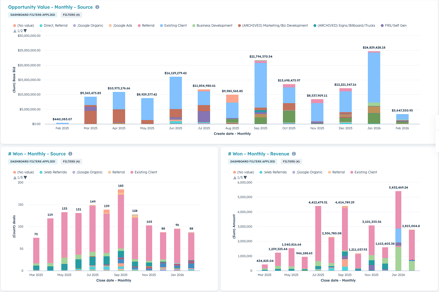
Without reporting clarity, you cannot confidently answer:
https://prnt.sc/uQNN_Zxu43po
A CRM centralizes performance data so decisions are grounded in measurable outcomes.
If you are comparing reporting depth and customization between major platforms, see HubSpot vs Salesforce for Window & Door Dealers.
Jobs move from consultation to measurement to installation.
A CRM helps:
• Organize site visits
• Track job progression
• Prevent scheduling conflicts
• Assign technicians
• Log installation milestones
• Align office and field teams
Industry-specific CRMs often include installation-focused scheduling and job tracking tools. Generic systems may require customization to support this level of operational detail.
Without structured scheduling inside your CRM, communication gaps increase.
Operational gaps are rarely obvious. They show up quietly.
Without a CRM:
Over time, these inefficiencies compound.
The cost is not just lost leads. It is reduced visibility and preventable friction.
Once you decide your business needs a CRM, the next step is selecting the right platform.
CRM systems differ in:
The most important question is whether the system supports your full workflow from inquiry through installation.
The best CRM depends on workflow needs, team size, and growth plans. Some companies prioritize marketing capabilities and choose general platforms. Others prioritize installation workflow and choose industry-specific systems.
Small companies with minimal lead volume may manage without one. As team size and job complexity increase, structured tracking becomes more valuable.
Some CRMs include built-in quoting tools. Others integrate with proposal software. Capabilities vary by platform.
Yes. Many CRMs offer scheduling tools or calendar integrations to manage site visits and installation timelines.
Pricing varies based on users, features, automation, and customization. Costs scale with business complexity.
A CRM is not simply a contact database.
It is a system for organizing growth.
In the window and door industry, revenue depends on structured follow-up, clear scheduling, and accurate visibility into performance.
When sales and operations operate inside one connected system, growth becomes measurable and manageable.
That structure is what enables consistency.
If your current process feels fragmented, unclear, or dependent on memory, it may be time to strengthen your infrastructure.
Start by exploring the right platform for your business:
And if you want help mapping out what your CRM system should look like before you choose one, connect with our team to build a smarter growth plan.
Structured growth starts with structured systems.

No Comments Yet
Let us know what you think